Quick answer
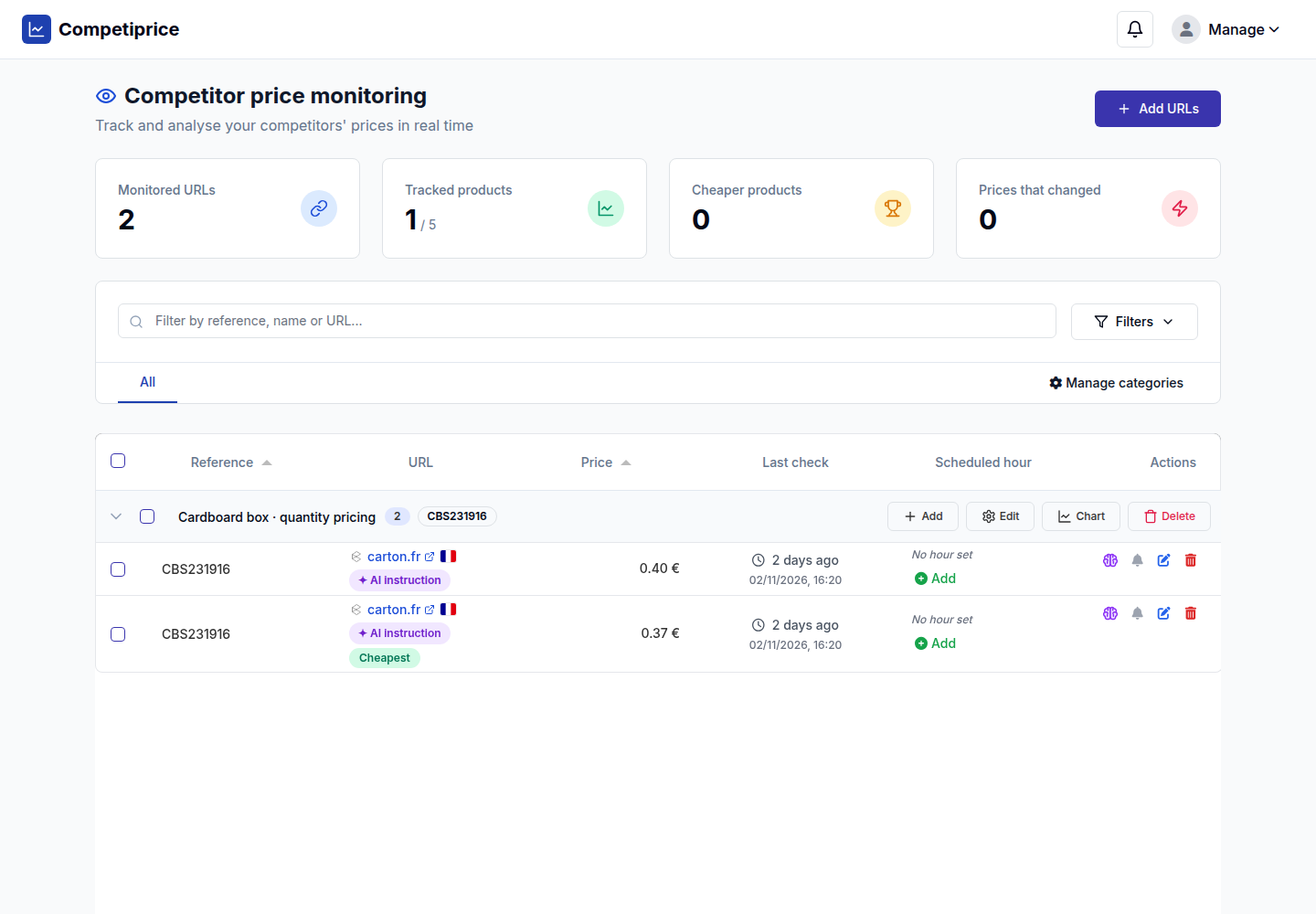
A product page can display several prices. With Competiprice AI instructions, you describe which one to track in plain language: the price of a new item, a specific product reference or a quantity tier. Test the instruction, then save the validated price. The same URL can also appear on several rows, each with its own instruction.
Finding the right page does not always mean finding the right price
You have found the correct competitor product page. It also contains a crossed-out price, a unit price, several quantity discounts and shipping fees. Collecting a number is no longer enough: you need the price that matches the offer you are comparing.
An AI instruction adds that context to your monitoring. Specify the reference, quantity or conditions to use. Competiprice uses this information to check the extracted price and correct it when the page provides the evidence needed. Each instruction belongs to one tracking row, so you can tailor your rules to each URL.
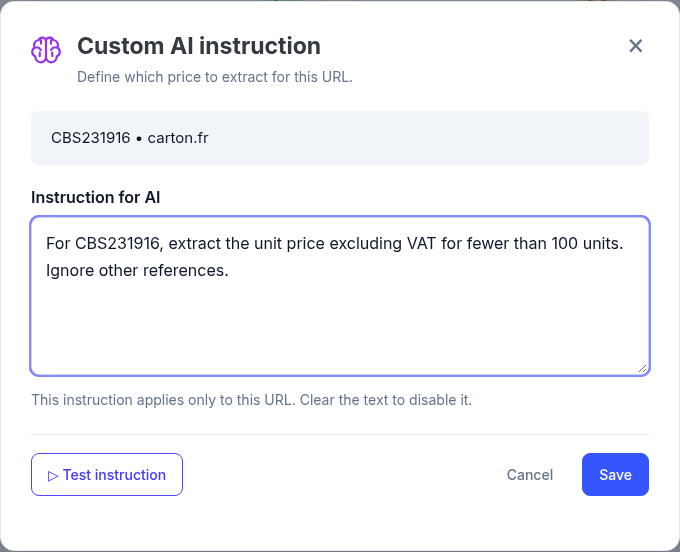
Set up an instruction in three steps
- Click the purple brain in the Actions column for the relevant row. The dialog shows the product reference and website so you can check that you are editing the right entry.
- Describe the price you need. Include the product or reference, quantity and any relevant conditions. Specify prices to ignore, such as a crossed-out amount or shipping fees.
- Test, then save. “Test instruction” displays the result without changing price history. “Save” applies a recent test result that is still valid. If there is no reusable test, a check starts automatically.
The same URL, two quantities, two tracked prices
Consider a page listing cardboard boxes with several quantity-based prices. You want to track the unit price for fewer than 100 units, as well as the price for orders of 100 units or more. Add the same URL twice to the same product, then set a different instruction on each row.
| Tracking row | Example instruction | Price validated during the test |
|---|---|---|
| Small quantities | CBS231916: extract the unit price excluding VAT for fewer than 100 units. | €0.40 excluding VAT |
| 100 units or more | CBS231916: extract the unit price excluding VAT for an order of 100 units. | €0.37 excluding VAT |
Both amounts were validated in a live test on carton.fr on 2 November 2026. They illustrate how the feature works and are not current price quotes. Each row keeps its own price, instruction and history, so you can monitor each quantity tier over time.
Try it · interactive illustration
Same page. Your instruction makes the difference.
Choose the quantity to track for reference CBS231916.
Price to track for fewer than 100 units: €0.40 excluding VAT.
Local demonstration: no price check or save is performed. Amounts come from the test on 2 November 2026.
Fetch one page, extract several prices
When these rows are processed in the same monitoring run and for the same country, Competiprice shares the page retrieval. The instructions are then applied separately. You get several tracked prices without downloading the same page again for each row.
Inside a monitoring run
One page retrieval, two independent histories
Simplified view of one monitoring run. Each row keeps its own price and history.
Once URL processing is complete, a single batch AI review checks the rows that have an instruction and usable page content. It can confirm a price, correct it and improve the locator used to find that amount in future checks. Decisions remain specific to each row.
Retrieval is shared for identical URLs within the same country and monitoring run. A later run fetches a fresh page. Different monitoring countries stay separate because a store may show different offers in each location. A separate manual test also performs its own check.
How to write a useful instruction
A useful instruction describes an offer that can be identified on the page. Be more specific than “take the right price” or “take the cheapest price”, which leave too much room for interpretation.
| Your goal | Instruction to adapt |
|---|---|
| Ignore a crossed-out price | Extract the current price including VAT for the new product sold individually. Ignore the crossed-out price and shipping fees. |
| Select a reference in a table | For reference CBS231916, collect the unit price excluding VAT for fewer than 100 units. Ignore other references. |
| Track a quantity tier | For this reference, collect the displayed unit price for an order of 100 units. Do not use the total price of the lot. |
Then compare the test result with the source page. Use consistent criteria across the offers you compare: reference, condition, quantity and whether VAT is included. Asking for a VAT-inclusive price does not automatically convert a price that is only displayed excluding VAT.
A verifiable price, with history for each row
The proposed price must be identifiable in the page content. An instruction cannot invent an amount, calculate a missing tax or reconstruct an inaccessible offer. If the result cannot be validated, Competiprice keeps the last recorded price for that entry.
Use these observations in your usual workflow: comparisons, price history and price alerts. To prepare reliable comparisons, read our guide to matching the right product references.
Frequently asked questions
Can I track several prices on exactly the same URL?
Yes. Manually add several rows for that URL, even for the same product and country. Each row can have a different AI instruction and keeps its own history.
Do I need to click Test instruction before Save?
No. Save starts a check if there is no reusable test. If you have just tested the same instruction and the context is still valid, the verified result is reused.
Is the same page fetched several times?
Rows with an identical URL and the same country share page retrieval within one monitoring run. Later runs, other countries and independent manual tests remain separate checks.
What happens if the instruction cannot identify a reliable price?
No new unvalidated price is published for that row. The last saved price is kept, and a message explains the verification result.